HTC's reassured us in a freshly updated FAQ that the One X and One S will continue seeing Jelly Bean updates as soon as carrier testing is finished, and it's also given us some insight into how it decides which smartphones will get the Android 4.1 treatment. The word is mum on exactly which other phones will be graced with the flavor of Android in question and Sense 4+, but the firm is reviewing its 2012 handsets to determine which are eligible. Two phones that didn't make the cut are the One V and Desire C, since HTC generally requires devices to pack more than 512MB of RAM in order to receive Jelly Bean. As for smartphones released in 2011, they'll also be considered once this year's hardware is evaluated. Chou and Co. also noted that they plan to post "generic development ROMs" of Jelly Bean for the One X and One S to its developer website as soon as they're fully baked. For the full lowdown, hit the source link below.
Showing posts with label Android. Show all posts
Tuesday, November 13, 2012
Android 4.2 reaches some Galaxy Nexus phones early, grab the GSM version here
As Google Play groans under the clicks of early shoppers, Google's apparently got its software sorted too. A new Android 4.2 file for the Galaxy Nexus over at XDA-Developers matches reports we've had from users who have already been gifted the latest version of Jelly Bean over-the-air. Now, this is the 'takju' version, meaning it's meant for GSM devices ordered directly from Google, although the phone meddlers at XDA-Developers already have all the details needed to make the switch to this specific iteration. Sure you've got the right GSM Galaxy Nexus? Then, once you've read all the instructions and warnings from those aforementioned developers, you can pick up the download at the source below.
Friday, October 12, 2012
Samsung Introduces GALAXY S III mini, a Compact yet Powerful Smartphone
Samsung Electronics Co., Ltd, a global leader in digital media and digital convergence technologies, today unveiled the GALAXY S III mini, a compact version of the flagship smartphone GALAXY S III. The GALAXY S III mini brings the high performance, intuitive ease-of-use and nature-inspired design of the GALAXY S III to an elegant, compact smartphone with a 4.0-inch screen. It can be an optimal choice for consumers who are looking for more practical smartphones.
“The GALAXY S III introduced a new concept of smartphone that has proven hugely popular around the world. We’re now delighted to bring its revolutionary design, intuitive usability and intelligence to the GALAXY S III mini in a more compact form,” said JK Shin, President and Head of IT & Mobile Communications Division at Samsung Electronics. “We continue to make every effort to provide extraordinary mobile experiences to meet a wide variety of user needs.”
The GALAXY S III mini is powered by Android™ 4.1 (Jelly Bean), the latest version of the world’s most popular smartphone operating system. Jelly Bean has fast, fluid and smooth graphics along with a new Google Search™ experience featuring Google Now™, which brings you just the right information, before you even ask.
Stylish and compact, the GALAXY S III mini shares the GALAXY S III’s breakthrough design and simple elegance. Its ultra-minimal curved frame delivers a rich natural feel, which is also reflected on its nature-inspired home screen, wallpapers and ringtones. Its beautiful 4.0-inch Super AMOLED display offers a generous viewing experience that lets you view multimedia and Web content in brilliant color and clarity. Its compact size gives users a comfortable grip and allows a convenient one-hand operation.
The GALAXY S III mini is packed with intelligent technology designed to make interacting with the phone incredibly natural and intuitive. S Voice, Samsung’s advanced natural language recognition software, lets you use your voice to unlock the phone with simple customized commands, or to play your favorite songs, turn the volume up or down, organize your schedule, or automatically launch the camera and start taking photos.
The GALAXY S III mini also understands your gestures to make using your phone easier and more natural: With Smart Stay, the phone’s camera tracks your eyes and keeps the screen lit as long as you are looking at it. When reading a text message from a friend, Direct Call enables you to automatically dial a call simply by lifting the phone to your ear; and Smart Alert conveniently alerts you to missed calls or messages as soon as you pick up your phone.
Content sharing is easy and fast on the GALAXY S III mini: Its S Beam feature lets you share a 10MB music file in just two seconds by simply tapping on another S Beam-enabled device including GALAXY S III or GALAXY Note II, even without a Wi-Fi or cellular signal. The ‘Buddy photo share’ function also allows photos to be easily and simultaneously shared with all your friends pictured in an image directly from the camera or the photo gallery.
Note to Editors
GALAXY S III mini Product Specifications
| Network |
HSPA 14.4/5.76 900/1900/2100
EDGE/GPRS 850/900/1800/1900
|
|---|---|
| Display | 4.0” WVGA Super AMOLED |
| Chipset | Dual Core 1GHz |
| OS | Android™ 4.1 (Jelly Bean) |
| Camera | 5MP AF + LED Flash / VGA Front |
| Video |
H.264, MPEG-4, H.263, VC-1,
SorensonSpark, WMV7, WMV8
Recording/ Playback : 720p
|
| Audio |
MP3, AMR-NB, AAC/AAC+/eAAC+,
WMA, OGG(Vorbis), FLAC
|
Additional
Features
| Game/Video/ Readers/Music Hub |
| Kies, KiesAir | |
| FM Radio (RDS) | |
TouchWiz
| |
Google™ Mobile
Services
|
Google Search, Google Maps, Gmail, Google Latitude
Google Play Store, Google Play Books, Google Play Movies
Google Plus, YouTube, Google Talk,
Google Places, Google Navigation, Google Downloads
|
| Connectivity |
WiFi a/b/g/n, WiFi HT40
GPS/GLONASS
NFC
Bluetooth® 4.0(LE)
|
| Sensor | Accelerometer, Digital compass, Proximity, Gyro |
| Memory |
8/16GB ROM+ 8Gb RAM,
microSDup to 32GB
|
| Dimension | 121.55 x 63 x 9.85 mm, 111.5 g |
| Battery | 1,500 mAh |
* All functionality, features, specifications and other product information provided in this document including, but not limited to, the benefits, design, pricing, components, performance, availability, and capabilities of the product are subject to change without notice or obligation.
* Android, Google, Android Beam, Google Search, Google Maps, Gmail, Google Latitude, Google Play Store, Google Play Books, Google Play Movies, Google Plus, YouTube, Google Talk, Google Places, Google Navigation, Google Downloads are trademarks of Google Inc.
Thursday, October 11, 2012
New in the mobile app: support for Google+ pages
Today we're rolling out v3.2 of the Google+ app to Android and iOS; both versions include one of our most highly-requested features: support for Google+ pages. This gives page owners the ability to post, comment, and interact with their followers directly from their mobile device.
Additionally:
- The Android version includes an updated widget, and a new 'Find People' experience.
- The iOS version adds iPhone 5 and iOS 6 support, and the ability to edit your posts.
The new app is available now from Google Play (http://goo.gl/xaxMx) and the App Store (http://goo.gl/RVv2S), so give it a spin and let us know what you think!
[SOURCE]
Additionally:
- The Android version includes an updated widget, and a new 'Find People' experience.
- The iOS version adds iPhone 5 and iOS 6 support, and the ability to edit your posts.
The new app is available now from Google Play (http://goo.gl/xaxMx) and the App Store (http://goo.gl/RVv2S), so give it a spin and let us know what you think!
[SOURCE]
Wednesday, October 10, 2012
Android 4.1.2 For Nexus 7 Rolling Out Now, Features Bug Fixes And Landscape Orientation Mode For Home Launcher
There’s been plenty of talk centered around iOS and Windows Phone 8 of late, but today seems to be the turn of Google and their fabulous Android OS as the Android Open SourceProject is seeing the release of 4.1.2 Jelly Bean. The 4.1.2 incremental update is only a minor improvement over the previous 4.1.1 release, but will definitely bring some notable improvements to Nexus 7 owners.
Some owners of the Nexus 7 tablet have already started seeing the Jelly Bean 4.1.2 update hitting their devices with an over-the-air update being available. The official changelog that accompanies the 4.1.2 build on the Nexus 7 isn’t exactly informative, but does state that it brings performance stability and fixes bugs as well as offering landscape orientation abilities to the home screen launcher of the device.

The rolling out of the update has been confirmed by a number of corners in the Androidcommunity with the expected download size coming in at approximately 32MB and contains nothing more than the minor changes mentioned above. The last few days and weeks have been bringing a number of rumors that have been centered around a possible LG Nexus device that was spotted running Android 4.1.2, but it looks like Android fans will need to wait until the release of Android 4.2 before anything like that comes to fruition.
The exact same build number that is associated with this 4.1.2 update has already been spotted in server logs in the last few days and as well as the Google Nexus 7 tablet, but has also been seen running on the Motorola Xoom, Galaxy Nexus and Nexus S devices. Before getting too excited, there isn’t any official announcement that Jelly Bean 4.1.2 will be coming to those devices, but it is a good indication that those gadgets will be getting the same treatment in the coming days or weeks.

Google’s chief release engineer, Jean-Baptiste Queru, has also offered a few words of advice to moderators who maintain community builds of Android for the Nexus 7, advising them to update those builds to 4.1.2 as soon as possible. He has also been active on the official Google Group page and stated that there is currently no official estimated time of arrival for any future builds of the Android OS. If you have a Nexus 7 tablet then make sure to keep checking for the 4.1.2 update.
Monday, October 8, 2012
Lockitron Lets You Unlock the Door With Your iPhone [VIDEO]
Apigy just made its Lockitron keyless entry technology smarter, letting you unlock your door from anywhere in the world — or having it automatically unlock when you walk up to it.
This $149 device installs on top of your existing deadbolt lever, and it works best if you have a Bluetooth 4 or NFC-equipped smartphone. That lets it sense your presence, magically unlocking the door without you even having to say “open sesame.”
Lockitron is equally helpful if you’re away from home, where you can use its new iPhone app to manually and remotely unlock the door for friends using a smartphone app. And you can give them their own access by entering their email address and phone number — then Lockitron gives them access using their smartphones.
It’s even smarter than that: Lockitron lets you know if someone has knocked on your door, and it can sense if your door has been unlocked, dutifully notifying you immediately.
If you’re using a cellphone, you’re not going to feel left out: using the SMS system, it lets you send text commands to the Lockitron website that will remotely unlock the door. And, if the unit’s batteries have worn out after a year, you can still use your key to open the door the old-fashioned way.
We’ve had the first version of Lockitron installed in our San Francisco offices since last year. On the whole, it’s a convenient device that works nearly all of the time, but it’s not 100% dependable — and has on occasion refused to work, leaving staff members locked out. Let’s hope this one improves on that score.
One obvious improvement: The first version of Lockitron cost $295, almost double the price of the new version.
Now available for preorder, Lockitron’s creators used a Kickstarter like process to fund this revised version, raising $715,500 from 4,770 eager backers so far, with 29 days left to go. Apigy is saying the first batch will be shipped in March, 2013. Apparently there are a lot of people who are interested in keyless entry controlled by a smartphone.
Would it be worth $149 to be able to walk up like a boss and have your door automatically unlocked for you? Let us know in the comments.
Saturday, September 29, 2012
Latest software upgrade rollout starts for Xperia™ go, Xperia™ U and Xperia™ sola – introducing new media applications and uplift to Android 4.0 Ice Cream Sandwich
Hello everyone,
Today we’re starting our software rollout for Xperia go, Xperia U and Xperia sola including Ice Cream Sandwich Android 4.0 upgrade and new unique media applications. The rollout will continue over the next few weeks in markets globally.
Some of the cool features and functionality you can look forward to include:
- New ways to experience your tunes, images, videos and films with Sony’s media applications – “WALKMAN”, “Album” and “Movies”
- Extended standby mode, increasing standby time by up to four times (depending on user-profile and data consumption)
- Lock screen with improved functionality
- Resizable widgets for improved personalization
- Improved control of your mobile data consumption
- Recent Apps button for a clear overview of your applications
I’m also excited to tell you about “Glove Mode” – a sweet feature in the software upgrade for Xperia sola (known as Xperia sole in some markets). It’s an extension of our “floating touch” technology that makes it possible to use your Xperia sola in the cold whilst wearing gloves… just in time for the winter months. My colleagues at Developer World have taken a closer look – head on over to check it out!
We’re kicking-off the rollout today, and ramping it up over the weekend – from mid next week you’ll be able to see software kits as they’re released (customized specific to your operator and handset) on our support community. Please check-back then for the direct link and continue to do so, as the list will be updated when new kits become available.
It’s worth noting that in order to upgrade, you will need to connect to a PC or Mac – please visithttp://www.sonymobile.com/update and follow the instructions.
Thanks for all your questions so far and as always, feel free to drop a comment or question below.
Ant.
*The availability and scheduling of this software upgrade and specific models upgradeable to Android 4.0 will vary by market and carrier requirements
ICS update lets you use Xperia™ sola with your gloves on [video]
If you’ve ever tried to use your smartphone in the freezing cold, no doubt you’ve had to take your gloves off in order to use it. Or maybe you’ve spent money on special smartphone gloves with finger flaps. Well, keep your money, stick to your old gloves and wave goodbye those cold fingers! With the new Ice Cream Sandwich (ICS) update for Xperia™ sola, you’ll find a new feature called glove mode, which is an extension of the Floating touch technology. As you might guess, this makes it possible to use the touch screen even though you’re wearing gloves. In this article, we explain the benefits of glove mode, and talk to Andreas Sandblad at Sony, who’s the inventor of this technology. Read on for the full story!
Keep your fingers warm with glove mode
When we first unveiled Xperia sola, this also marked the introduction of a new technology never before seen in any smartphone called Floating touch. This technology lets you highlight the links in the web browser without even touching the screen. Now, with the Xperia sola ICS update, you’ll find a new extension of Floating touch™, called glove mode, which lets you use your Xperia™ sola with your gloves on.
Andreas Sandblad, software architect at Sony and inventor of glove mode, explains how he came up with the idea for glove mode:
I came up with the idea during a brain-storming session at the office, where we were discussing what cool features we could use Floating touch™ for. I’m much of an outdoor person myself, who likes to hike in the mountains, and I guess I was trying to solve the frustrating real world problem of not being able to use my phone with gloves. Turns out other people felt the same thing, and here we are. I really think glove mode is a must have.

Andreas Sandblad, software architect at Sony and inventor of glove mode.
How it works
Glove mode is enabled by default in the ICS upgrade for Xperia™ sola, so when you unlock the phone while wearing a glove (or with a bare finger in the air), you will enter glove mode and Floating touch™ mode will be disabled. In this mode, both glove touch and normal touch usage will work, for example, if you take off the gloves. There is also a cursor ring shown where you press the screen with your glove, to help you understand where you are actually pressing the screen. To turn off glove mode, you simply lock the screen and then unlock it with your bare finger touching the screen and you’re back to normal mode with Floating touch™ enabled.

Screenshot showing the cursor ring that guides you when using glove mode.
The solution to detect glove mode when you’re unlocking the screen is a quite clever concept, because it allows the phone to support both glove mode and normal mode supporting Floating touch™ – what mode is entered is decided by how you unlock the screen. In glove mode we support gloves and normal touch, while in non-glove mode applications can use the Floating touch™ API (a tutorial for using this API will be published soon).
To make it possible for you to use the touch screen with a glove, the Floating touch™ events that are generated when you are touching the screen with a glove (or hovering over the screen) are rewritten as normal touch events. As you may have figured out already, it is the finger inside the glove, and not the actual glove, that the touch screen reacts to.
To get an accurate behaviour and make sure the UI only reacts when the glove is actually touching the screen and not when just hovering above the screen, some clever algorithms are used to filter the Floating touch™ event stream (depending on the glove texture thickness) before rewriting them as normal touch events. This way, you are not generating a lot of accidental touch events on the screen, while wearing a glove.

Demonstration of glove mode on Xperia™ sola with ICS update.
If you like, you can disable the auto-detection of glove mode in the phone Settings, under Display:

Glove mode setting.
So next time there is an incoming call when it is cold outside and you are wearing gloves, you can impress your friends by picking up the phone and answering the call with your gloves on!
Friday, September 28, 2012
Introducing Facebook Gifts
Every day, millions of people share special moments with their friends on Facebook by saying "Happy Birthday," "Congratulations," or simply, "I'm thinking of you." Now there is another way to celebrate those moments.
Starting today, you can give real gifts to your friends on Facebook using Gifts.
Gift easily and instantly You can send gifts from birthday reminders, or from your friend's timeline.
You can pay right away or add your payment details later. Your friend provides their address.
To make sure they love the gift, they can choose the color, size or flavor that they want, or even exchange it for something else of equal value.
There are hundreds of gifts with more added every day: cupcakes from Magnolia Bakery, a stuffed animal from Gund, or a digital gift card from Starbucks.
Availability
Facebook Gifts will roll out gradually, first to people in the U.S. To learn more, visitFacebook.com/Gifts.
Wednesday, September 26, 2012
Google Play hits 25 billion downloads
Whether you’re looking for directions, checking email or sharing a picture with friends, apps are now an indispensable part of life. And if you’re using Android, it all starts with Google Play, home to 675,000 apps and games. That’s a lot of choice. We’ve now crossed 25 billion downloads from Google Play, and to celebrate we’re offering some great discounts for the next five days.
Every day you’ll be able to choose from a collection of apps from some of the world’s top developers including Gameloft, Electronic Arts, Rovio, runtastic, Full Fat and more. And all for just 25 cents. We’ll also be offering some special collections like 25 movies you must own, 25 banned books, 25 albums that changed the world and our 25 top selling magazines, all at special prices. Visit Google Play a little later today to check them out.
Twenty-five billion is more than twice the distance, in miles, that the Voyager 1 spacecraft has travelled since its launch 35 years ago. It’s the amount of time, in minutes, that have passed since some of our earliest ancestors began to set foot in Europe. And now, thanks to all of you, it’s a Google Play milestone. We look forward to the next 25 billion.
Posted by Jamie Rosenberg, Director, Digital Content
[SOURCE]
Every day you’ll be able to choose from a collection of apps from some of the world’s top developers including Gameloft, Electronic Arts, Rovio, runtastic, Full Fat and more. And all for just 25 cents. We’ll also be offering some special collections like 25 movies you must own, 25 banned books, 25 albums that changed the world and our 25 top selling magazines, all at special prices. Visit Google Play a little later today to check them out.
Twenty-five billion is more than twice the distance, in miles, that the Voyager 1 spacecraft has travelled since its launch 35 years ago. It’s the amount of time, in minutes, that have passed since some of our earliest ancestors began to set foot in Europe. And now, thanks to all of you, it’s a Google Play milestone. We look forward to the next 25 billion.
Posted by Jamie Rosenberg, Director, Digital Content
[SOURCE]
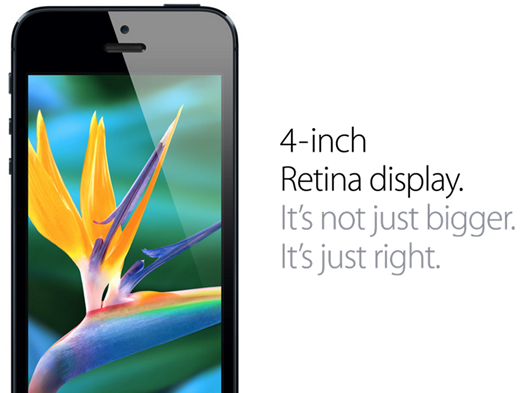
DisplayMate: iPhone 5 Display Is Better Than “Any Consumer Display” You Own, Beats Galaxy S III
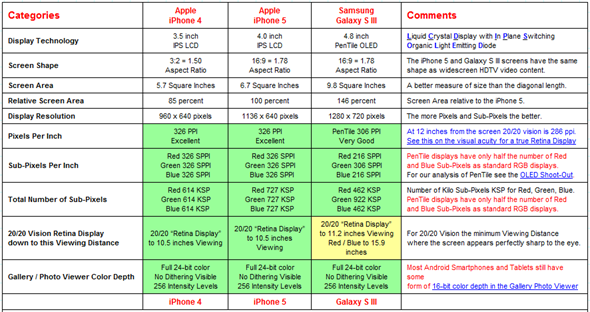
From its internal hardware, software to its design, and camera, we’ve covered just about every possible aspect of the iPhone 5 here at Redmond Pie. One aspect that hasn’t been covered in more technical detail is its display. We know that it’s 4-inch tall, has a 16:9 widescreen aspect ratio, a resolution of 1136 x 640 and a corresponding pixel density of 326 pixels per inch, but we weren’t sure just how much of an improvement it is when it comes down to visual quality and fidelity, until now that is.
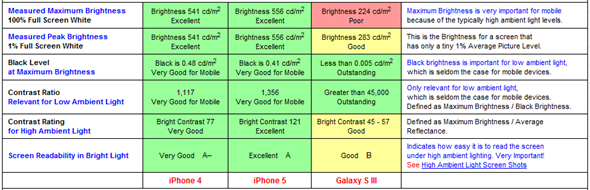
DisplayMate – a company that produces state of the art calibration tests for evaluating and setting up video hardware – has very closely and technically evaluated the iPhone 5’s display and compared it against the iPhone 4 to see how much Apple’s display technology has improved, and the Galaxy S III to see how it compares with what is often perceived as the king of smartphone displays because of its sheer size and HD resolution, even though it has a lower pixel density than even the two year old iPhone 4.

According to DisplayMate’s tests, the iPhone 5 display is a considerable improvement over the displays of the iPhone 4 and 4S. Every category that they measured – save for Brightness Decrease with Viewing Angle – was improved “by a bit” and sometimes “by a lot”.
Color accuracy has improved, color gamut has received a boost, “Screen reflectance” has decreased by 52%, and contrast has increased by 57%. Save for a “minor gamma intensity” and increased power consumption at max. brightness over iPhone 4, it is more accurate than any consumer display, with it being second only to the new iPad.

The Galaxy S III test DisplayMate conducted mentioned its brightness being “about half” of the iPhone 5, having a smaller color gamut with green being dominant over red / blue giving the display a green tint of sorts. It also isn’t calibrated well with the Standard sRGB color gamut, resulting in overly saturated images. Power efficiency is also lower than the iPhone 5.
DisplayMate gave the Galaxy S III, iPhone 4 and iPhone 5 an overall display grade of B+, A- and A, respectively.

Even anecdotal tests – which put the displays side by side showing the same content – come to the same conclusion: the iPhone 5 has the best smartphone display in the market today.
Tuesday, September 25, 2012
Sony to launch flat external batteries for phones, tablets
Sony will launch a new line of small, flat, external batteries to provide extra juice for tablets and smartphones, the first such products to use its thin "laminate" technology, it said Monday.
The Tokyo-based electronics firm announced several models, including one with 7,000 mAh capacity, that it says provides about three full charges to a typical smartphone, at 2.1 amps when both of its USB ports are used. The battery weighs 198 grams and measures 130.6 millimeters by 70.4mm by 12.9mm, on a par with many smartphones.
"This thin type of battery is Sony's strength," said spokesman Jin Tomihari. "The smartphone market is growing, so the battery market is also growing accordingly."
The company is marketing the new batteries as having the same thin profile as modern phones and tablets, making the two easier to store together. Sony will also launch a slightly smaller model that holds 3,500mAh, as well as a colorful batch of smaller cylindrical 2000mAh batteries.
This is on par with modern smartphones: Apple's new iPhone 5 is said to have a 1440mAh battery, while Samsung's Galaxy S3 has a 2100mAh battery.
Sony is know mainly for its electronics, games and media holdings, but the company also has advanced battery technology, including for batteries in which the components are laminated together, cutting weight and materials as well as allowing a greater variety of forms.
The company announced the new batteries for the Japanese market, with the round type to go on sale from Oct. 13 and the flat variety from Nov. 14 in Japan, with prices ranging from 2,300 yen (US$30) to 7,000 yen depending on the capacity.
Global launch dates and prices will be around those for the Japanese market, Tomihari said.
Sony said the 3,500mAh version of its new line can be reused about 500 times, and can charge a typical smartphone in about 130 minutes. They can be recharged in about 8 hours by USB and 4 hours by electric socket.
Sony was an early adaptor of current rechargeable battery technology, and was the first to market with lithium-ion batteries in 1991.
Subscribe to:
Posts (Atom)