Nuffnang Ads

GadgetFood

Showing posts with label iPhone. Show all posts

Thursday, October 11, 2012

Our tests find 'purple haze' effect isn't limited just to the iPhone 5


When our testers oriented the iPhone 4S at a particular angle, it displayed the same purple haze many testing websites have claimed is more prominent on the iPhone 5.
The Apple iPhone 5, which our Ratings reveal is a standout camera, is no more prone to purple hazing on photos shot into a bright light source than its predecessor or than several Android phones with fine cameras, according to special Consumer Reports tests.
We carried out our tests in response to reports, including those from PCMag.com and DPReview.com, that theiPhone 5 had a tendency to display a distracting purple color over parts of certain shots and videos. In our tests, the phone's camera did indeed display such a haze when we shot into a bright light source in our labs.
But it didn't do so in any more pronounced a fashion than did the iPhone 4S or two Android-based smart phones, the Samsung Galaxy S III and Motorola Droid Razr Maxx, when we tested those under the same conditions. In the course of our tests, the haze was sometimes purple, but sometimes another color or even a rainbow.
All camera lenses, even those made for expensive SLRs, can yield lens flare, which is produced by scattered reflections inside the lens from a bright light source. How much flare appears in an image depends on how you orient the lens.
For example, lens flare often occurs on bright, cloudless sunny days, when you include the sun itself in the image or, if the sun isn't in the image, strong sunlight shines into the lens from an angle. Some expensive advanced cameras, and even many point-and-shoots, have special lens coatings that can limit or eliminate such flare, and possibly associated colored haze. So can attaching a shading hood around the lens's edge. But smart phones' cameras are designed differently, so it's typically more difficult for manufacturers to minimize flare in them.
Although this problem can be annoying, it's one that will probably not affect most of your photos, since it occurs only when a bright light source, such as the sun appears in the frame of the photo or just outside it. It's also pretty easy to minimize by using your hand to shield your phone's lens from the sunlight. You can avoid it altogether by reframing your photo or video whenever a bright light source appears in or near the frame


[SOURCE]

Monday, October 1, 2012

Italians Pay The Most, Americans The Least For iPhone 5


Italians Pay The Most, Americans The Least For iPhone 5
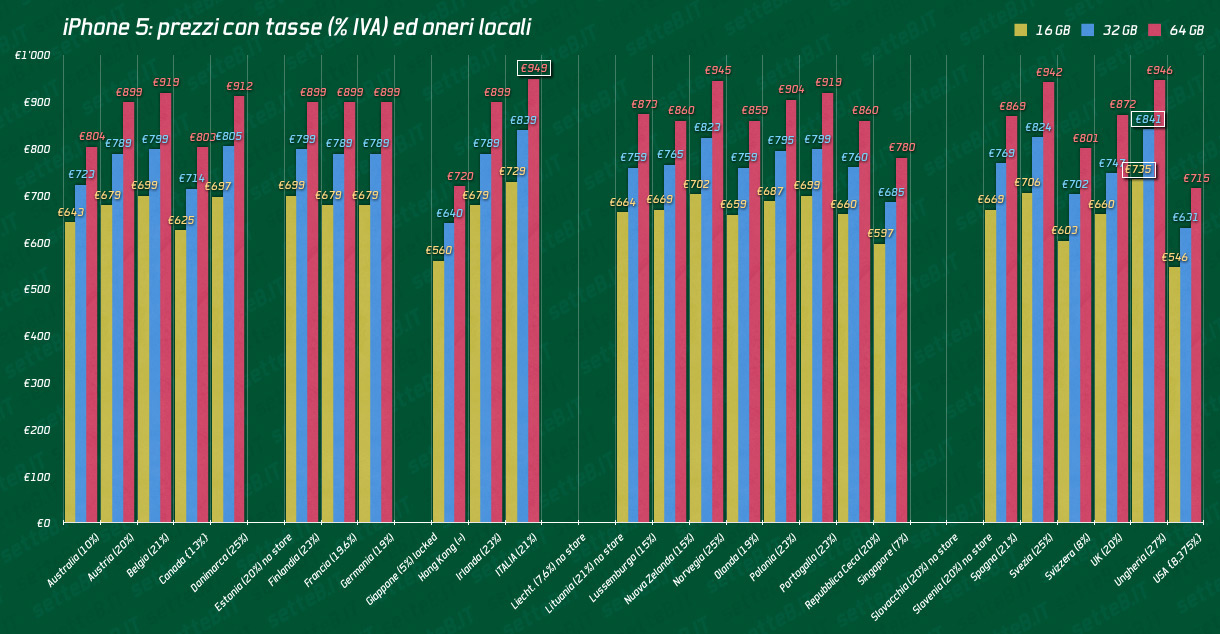
The iPhone 5 arrived in 22 more countries and we now have a nice summary as to what Apple’s newest handset will cost depending on where you live. According to Setteb.it, Italians will pay the most for the iPhone 5, while Hong Kong residents will get the best deals overseas. Not surprisingly, Americans get the best deal overall.
Take a look (click to enlarge):
Prices for iPhone 5
Prices for iPhone 5
Note: Prices are on unsubsidized models and after tax. Currently, €1 is equal to $1.2922.
The iPhone 5 is now available in Austria, Belgium, Czech Republic, Denmark, Estonia, Finland, Hungary, Ireland, Italy, Liechtenstein, Lithuania, Luxembourg, Netherlands, New Zealand, Norway, Poland, Portugal, Slovakia, Slovenia, Spain, Sweden, and Switzerland. On Sept. 21, the United States, Australia, Canada, France, Germany, Hong Kong, Japan, Singapore, and the United Kingdom were the first to receive the handsets.

Wednesday, September 26, 2012

Garmin Updates iPhone Navigation Apps with Public Transportation Features and Apple Maps Integration


NAVIGON_UrbanGuidance_List_USNAVIGON_UrbanGuidance_Map_US


On the heels of the release of iOS 6, Garmin today updated its NAVIGON navigation app to add public transportation features, Apple Maps integration and full support for the new 4-inch screen of the iPhone 5. A similar update for the Garmin StreetPilot Onboard iPhone app will follow soon. 
“With our recent updates our apps can now serve as an extension to Apple Maps, providing iPhone users advanced navigation capabilities,” said Joern Watzke, vice president mobile phone business at Garmin Wuerzburg GmbH. “This includes our new public transportation functionality as well as many additional premium features that aren’t available on free navigation apps.”
Users can simply select any address or point of interest in Apple Maps and they will be offered the option to navigate to the selected destination using their NAVIGON app[1]. Both the StreetPilot Onboard and the NAVIGON app feature onboard maps that allow route calculations even in areas where cell coverage fades. Additional premium features include comprehensive lane guidance, speed limit and safety camera warnings, exit services, parking info, a trip planner and multi-route display, among many other functions[2].
The NAVIGON app will also fully utilize the 4-inch display of the iPhone 5, which makes it easier to see all the details in the map view, such as speed limits or points of interest. This comes in especially handy when depicting a lot of infromation at the same time, such as the map, lane guidance and speed limits.
New Pedestrian and Public Transportation Features
With Urban Guidance users are able to integrate public transportation into their route, complete with detailed itineraries of transit stops. The new feature considers trains, trams, busses and water taxis when calculating pedestrian routes. Users will be guided to a transit stop by foot and be able to look up detailed information on what line to take and where to get off. The new Last Mile function automatically saves the location of the user’s car when continuing by foot, making it easy to find it on the way back. To depict the user’s surroundings, the upcoming Garmin StreetPilot Onboard app update will also include new graphical features such as Google Street View and Panorama View 3D (in app purchase). Learn more about these new features here.
 The NAVIGON apps are up to 25 percent off until October 3, 2012. The in app purchase Urban Guidance is 40 percent off. The Garmin StreetPilot Onboard app will also be available at a reduced price once the update becomes available.
NAVIGON USA: $39.99 instead of $49.99
NAVIGON North America: $44.99 instead of $59.99
NAVIGON MyRegion: $24.99 instead of $29.99
Urban Guidance (In App Purchase): $2.99 instead of $4.99 


[1] The NAVIGON app needs to be installed on the user’s iPhone to be offered as a navigation option.
[2] Some features are only available for either the NAVIGON or the Garmin StreetPilot Onboard app.


How To Build an iPhone 5 Dock for $1.27


Since the iPhone 5 Lightning adapter has a chip that prevents you from using third-party cables, you can forget about using an inexpensive off-brand dock. And since Apple hasn't yet released its own branded dock, you're basically stuck, for now, just plugging the phone into a loose cord.
That is, unless you've got a buck and some change and a spare couple of hours.
That setup didn't suit Casey Neistat, a filmmaker who prefers to keep a (now obsolete) dock firmly bolted to his desk. So he set out to build a simple plywood stand using scraps from the hardware bins in his well-stocked studio. Neistat had the parts on hand, but, as for a total project cost, he estimated, "about $1.27?"
That's assuming you have all the appropriate power tools on hand, but honestly if you don't own a drill you may not want to embark on this project in the first place. The filmmaker explains the procedure in the 3-minute clip above. Here are a few highlights of his design—if you take on your own DIY dock project, keep these details in mind:
  • Rout out a channel for the cord to travel in through the base of the stand.
  • Use glue and a cable clamp to hold the cord so it doesn't strain as the phone pulls away.
  • Any scrap 3/4-inch lumber works; just give the phone a second piece to lean against.
Nice work!
You can follow Casey Neistat on Twitter.

iPhone 5 and Nokia Lumia 920 face off with image stabilization test (hands-on video)


iPhone 5 and Nokia Lumia 920 face off with image stabilization test handson video
Nokia's Lumia 920 packs the industry's best image stabilization -- there's no questioning that -- thanks to a camera module that pairs both sensor and lens-based optical IS. The iPhone 5 also offers a notable improvement over its Apple-made predecessor on the video front, but considering that its stabilization is of the digital variety, we wouldn't expect it to top Nokia's new flagship. We had an opportunity to test both smartphones in a head-to-head demo at Nokia's research and development facility in Tampere, Finland, about two hours north of the company's Espoo headquarters. In fact, we're told that this is the very first such comparison shoot in the world, considering that the iPhone made it to market just last week and the only opportunity to shoot with a Lumia 920 is currently in the European country where the device was born.
As expected, the Nokia phone was able to capture far smoother video than what we snapped with the iPhone, with both devices secured side-by-side in a homemade foam holster. Unlike our handheld interview shoot earlier today, we pushed the limits a bit further this time, running through Nokia's parking lot and turning every which way as well. It's important to note that the Lumia 920 we used was a prototype, but its performance was still quite solid. You'll find the side-by-side video just past the break -- the Lumia 920 is on the left, with the iPhone clip on the right.
Myriam Joire contributed to this report.


FIFA SOCCER 13 For iOS Now Available – Download Now!


If you like your football (or soccer, for those residing in the U.S., New Zealand, Australia et al), then it’s likely that you’ve played Electronic Arts’ FIFA titles on a number of occasions. Now favored by the majority as the simulator of choice on most platforms, EA has really upped the ante over the past five or so years, and although Pro Evolution Soccer (or PES) used to be a fierce competitor to FIFA, it has slipped off the radar thanks to the sheer brilliance of one of EA’s flagship titles.
Having played it regularly on the Xbox and subsequently, the Xbox 360, since 2003, I’ve witnessed its transcendence from a good game to a great one, but the mobile version – which has rolled through quite a few iterations now – hasn’t quite been as enthralling.

FIFA SOCCER 13

As an avid footie fan, I’ve been rather addicted to First Touch Games’ Dream League Soccer on iOS, which, to me, is a great deal more realistic and immersive than FIFA has been, but like any true supporter, I always check out the latest FIFA and assess the improvements – hoping to find my next 9 months’ worth of distraction.
EA has today provided that by dropping the vastly-improved FIFA SOCCER 13 over at Apple’s App Store. The chunky, visual mediocrity which has served us on all previous mobile editions of FIFA looks to have made way for the trademark, smooth and downright addictive scenario we’ve become accustomed to on the Xbox 360 and PlayStation 3.

mzl.ndkfnudr.480x480-75

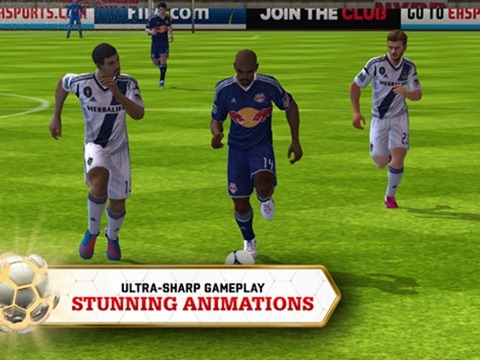
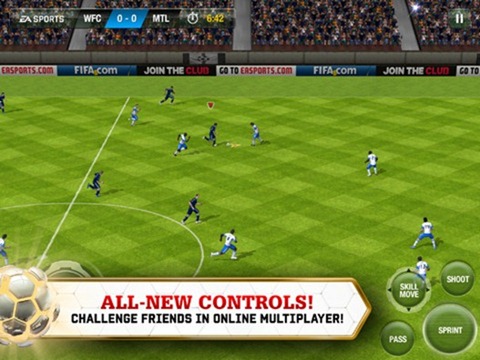
Graphics are important, for sure, and EA describes them rather accurately as “groundbreaking,” but the continual playability stems mainly from the gameplay itself. The Skill Move button allows you to swipe your way to Cristiano Ronaldo-esque finesse, and with your usual glut of leagues, teams, and stadia (all official and licensed, of course), this is certainly a keeper.

mzl.deroelne.480x480-75

You can play against like-minded folk online, or you can play master tactician in Manager mode, and in my experience, a little bit of both makes for a well-rounded FIFA experience.
It’s universal, so you’ll only have to buy it once if you wish to play on your assorted iDevices, and iCloud Sync support means you can start your league on your iPhone at work (not my recommendation; wink), before continuing your climb up the league at home on your iPad.

mzl.esjeqfai.480x480-75

It supports the iPad 2 / 3, iPod touch 3g / 4g, and every iPhone back to the 3GS. No support for that 16:9 display of the iPhone 5, but you know that’ll be arriving in the not-so-distant future.
Download via the link below, although I must warn – it’s a slippery slope to addiction!

(Source: FIFA SOCCER 13 for iOS on App Store)


DisplayMate: iPhone 5 Display Is Better Than “Any Consumer Display” You Own, Beats Galaxy S III


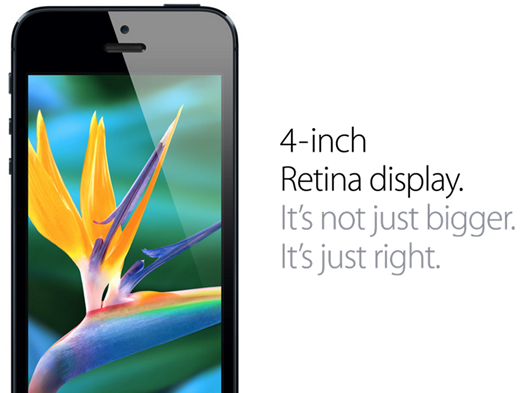
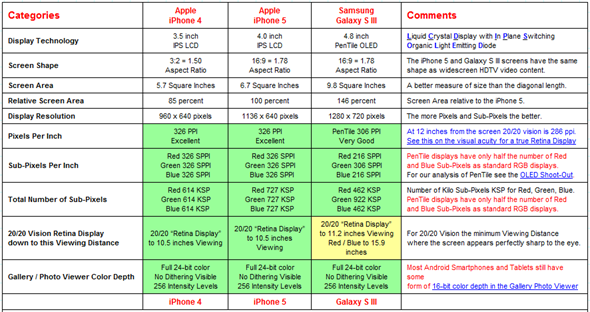
From its internal hardware, software to its design, and camera, we’ve covered just about every possible aspect of the iPhone 5 here at Redmond Pie. One aspect that hasn’t been covered in more technical detail is its display. We know that it’s 4-inch tall, has a 16:9 widescreen aspect ratio, a resolution of 1136 x 640 and a corresponding pixel density of 326 pixels per inch, but we weren’t sure just how much of an improvement it is when it comes down to visual quality and fidelity, until now that is.
DisplayMate – a company that produces state of the art calibration tests for evaluating and setting up video hardware – has very closely and technically evaluated the iPhone 5’s display and compared it against the iPhone 4 to see how much Apple’s display technology has improved, and the Galaxy S III to see how it compares with what is often perceived as the king of smartphone displays because of its sheer size and HD resolution, even though it has a lower pixel density than even the two year old iPhone 4.

iPhone 5 retina display

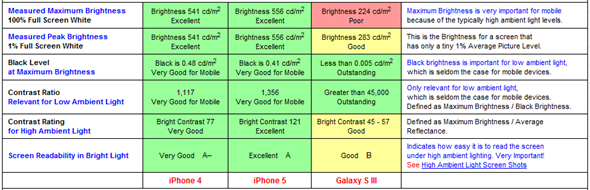
According to DisplayMate’s tests, the iPhone 5 display is a considerable improvement over the displays of the iPhone 4 and 4S. Every category that they measured – save for Brightness Decrease with Viewing Angle – was improved “by a bit” and sometimes “by a lot”.
Color accuracy has improved, color gamut has received a boost, “Screen reflectance” has decreased by 52%, and contrast has increased by 57%. Save for a “minor gamma intensity” and increased power consumption at max. brightness over iPhone 4, it is more accurate than any consumer display, with it being second only to the new iPad.

display test iphone 5

The Galaxy S III test DisplayMate conducted mentioned its brightness being “about half” of the iPhone 5, having a smaller color gamut with green being dominant over red / blue giving the display a green tint of sorts. It also isn’t calibrated well with the Standard sRGB color gamut, resulting in overly saturated images. Power efficiency is also lower than the iPhone 5.
DisplayMate gave the Galaxy S III, iPhone 4 and iPhone 5 an overall display grade of B+, A- and A, respectively.

iphone 5 sdisplay grading

Even anecdotal tests – which put the displays side by side showing the same content – come to the same conclusion: the iPhone 5 has the best smartphone display in the market today.


Monday, September 24, 2012

GadgetFood For Thought

Since the release of iPhone 5, millions of it have been sold, stores are sold out for it and people are still demanding for it! The amount of iPhone 5 that has been pre-ordered in 3 days is as much as iPhone 4S’ pre-ordered in a month! That is more than triple of the amount pre-ordered.

Apple has been so successful over the past few years and many would say that their success is all down to their brilliant products. Are Apple’s products that successful OR is it their marketing strategy that is successful?

Few days ago, I came across someone saying that Apple’s products are overrated but they have a really good marketing strategy that is turning their products into jewels.

Apple was rarely talked about before they came out with their best selling product, the iPhone. Since then, Apple has enjoyed nothing else but success. After iPhone, iPod Touch came out and of course, iPad.

If you have paid more attention, iPod Touch came out right after iPhone became so famous that everyone wants to have it due to its innovativeness but Apple realizes that there is a market segment that they are missing out, the kids and the teenagers. They would have shown much more interest in their products compared to the adults. But how is Apple gonna reach out to them? It is near impossible that parents would buy a phone that costs more than RM2000 for their kids when they themselves are using phones that are less than RM500. And so, they came out with a product that is so similar to iPhone. Only without phone functions, the iPod Touch.

In 2010, Apple introduced iPad to the world. Now look at the timing of it. During that time, iPhone has became so famous that people will think of iPhone when the think of Apple. Apple became such an established name for quality and innovation and they took full advantage of it and introduced the iPad. Some would say it is just an enlarged iPod Touch or iPhone but to most, it is an innovative Apple product and I just have to get my hands on it.

Coincidence much? Is Apple’s product really that amazing or is it that Apple has a really good marketing strategy that is driving them to greater heights? Let us know what you think by leaving your comments down below.

Nuffnang Ads